Example example_addReads_addExports
Part of the full Java 9 Jigsaw modules example suite.
|
Authors
Originally written by Martin Lehmann, Kristine Schaal and Rüdiger Grammes (cf. original repository). Migrated for Java Modules support documentation of Apache MavenTM in the course of the Maven Support & Care program by Gerd Aschemann (and other team members) as forked repository. Please add discussions, requirements, bugfixes, etc. to the fork instead of the original. |
What is this example about?
Module Dependency Graph, created with DepVis
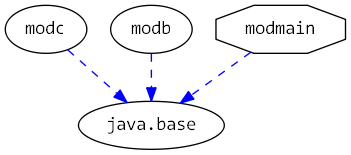
Example shows …
How to use --add-reads and --add-exports for javac compiler and java launcher.
All module-info.java files are empty.
All configuration is done via command-line options --add-reads and --add-exports in compile.sh and run.sh for javac and java.
-
modbneeds a read relationship tomodc -
modcneeds to export its packagepkgctomodb -
modmainneeds a read relationship tomodb -
modbneeds to export its packagepkgbtomodmain
|
Don’t try this at home
This example demonstrates an anti-pattern.
Using These flags should only be used for testing scenarios where you need test-only dependencies (like JUnit) without polluting production module descriptors. For a realistic example of proper usage, see Issue #5: Realistic testing example. Better alternatives: Declare proper See also: Why you shouldn’t use --add-exports. |
Output
This example uses golden master testing to ensure output consistency.
The expected output is compared with actual output using verify.sh.
Maven 4 Migration
This example demonstrates module system boundary overrides using --add-reads and --add-exports flags.
These flags must be configured for both compile-time and runtime.
Maven 4 Compiler Changes
The Challenge
This example shows how to override module boundaries at compile time and runtime. Without explicit configuration, the compiler will reject:
-
modbreading frommodc(norequiresdeclaration) -
modmainreading frommodb(norequiresdeclaration) -
modmainaccessing non-exported packages frommodbandmodc
The Solution
Configure the compiler plugin with the necessary --add-reads and --add-exports arguments:
<plugin>
  <groupId>org.apache.maven.plugins</groupId>
  <artifactId>maven-compiler-plugin</artifactId>
  <version>4.0.0-beta-3</version>
  <configuration>
    <compilerArgs>
      <!-- Required for cross-module access without explicit requires/exports -->
      <arg>--add-reads</arg>
      <arg>modb=modc</arg>
      <arg>--add-reads</arg>
      <arg>modmain=modb</arg>
      <arg>--add-exports</arg>
      <arg>modc/pkgc=modb</arg>
      <arg>--add-exports</arg>
      <arg>modb/pkgb=modmain</arg>
    </compilerArgs>
  </configuration>
</plugin>
The runtime configuration in run.sh must include the same flags:
java --module-path mlib  \
     --add-modules modb,modc            \
     --add-reads   modmain=modb         \
     --add-reads   modb=modc            \
     --add-exports modb/pkgb=modmain    \
     --add-exports modc/pkgc=modb       \
     --module modmain/pkgmain.Main
Key Takeaways
-
Use
<compilerArgs>to pass module system override flags to the compiler -
Both compile-time and runtime configurations must specify the same overrides
-
--add-readsallows a module to read another without declaringrequires -
--add-exportsmakes non-exported packages accessible to specific modules -
These flags are useful for migration scenarios or working with third-party modules